ClipSave Guide: Save Facebook Videos Fast & Secure
Are you looking for a way to download high-quality Facebook videos to your phone or computer? ClipSave is an online tool that supports downloading Facebook videos quickly, helping you save videos in HD, Full HD, 2K, or 4K quality directly on your browser without installing software.
ClipSave.app works simply, is easy to use, and is compatible with most devices such as Android, iPhone, Windows, and macOS. You just need to copy the Facebook video link, paste it into the tool, and then click the Download button to save the video to your device in a few seconds.
In addition to regular Facebook videos, ClipSave also supports downloading Facebook Reels, converting videos to MP3, and processing some restricted content through an advanced download feature. All are completely free and require no account registration.
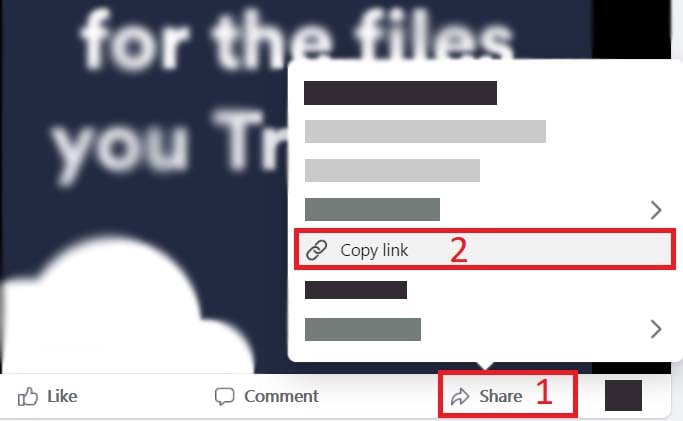
Step 1: Copy the Facebook video link
Open the Facebook app or access Facebook.com on your browser, then find the video you want to download. Tap the Share button and select Copy link to get the video URL.
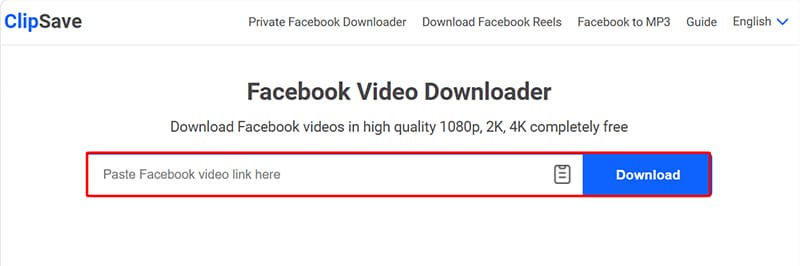
Step 2: Paste the link into ClipSave
Access https://clipsave.app/en using a web browser on your phone or computer. Paste the copied Facebook link into the input box at the top of the page, then press the Download button for the tool to start processing the video.
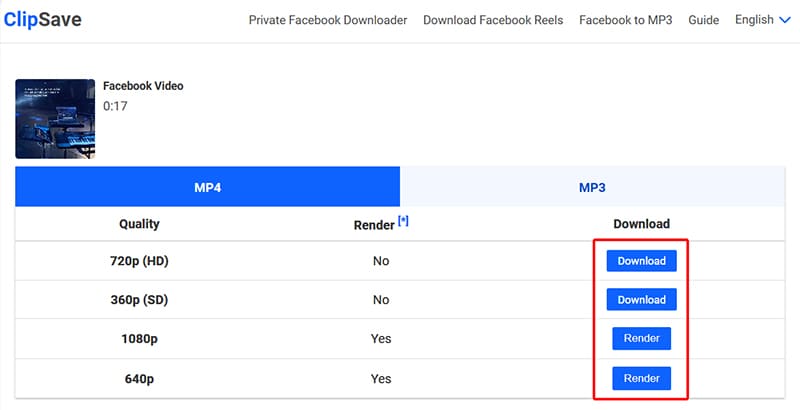
Step 3: Select quality and save video
After a few seconds of processing, ClipSave will display suitable download options such as MP4 or MP3, along with multiple quality options like SD, HD, Full HD, or 4K (if available). Select your desired format and press Download to save the file to your device.
Note
- For high-quality videos such as HD, 1080P, 2K, or 4K, Facebook usually separates the video and audio streams. Therefore, the system needs extra time to process and merge the data before generating a complete download link.
- For some restricted content, you can use ClipSave's advanced download feature on a computer browser to support more efficient video processing.
- If you encounter errors during use, please contact support for prompt assistance.